If you’re exploring ways to get started with the Klink ecosystem, the good news is that it’s become incredibly straightforward. You can now buy, swap, and stake $KLINK directly from Klink’s own platform, no juggling between different exchanges or worrying about complicated bridge setups.
Let’s walk through exactly how it works and what you’ll see along the way.
Step 1: Buying $KLINK
$KLINK is available exclusively on the BNB Smart Chain (BSC). That means you can connect any wallet to swap to BSC network or add BSC network to your wallet, MetaMask is the easiest and most common option. You can start from either of these links:
The main ecosystem portal: klinkfinance.com/ecosystem
Or go directly to the swap page: klinkfinance.com/ecosystem/app/swap
Here’s what happens next:
Connect your wallet: Click “Connect Wallet” at the top. Once your MetaMask is connected, the site will automatically detect your BSC wallet address.
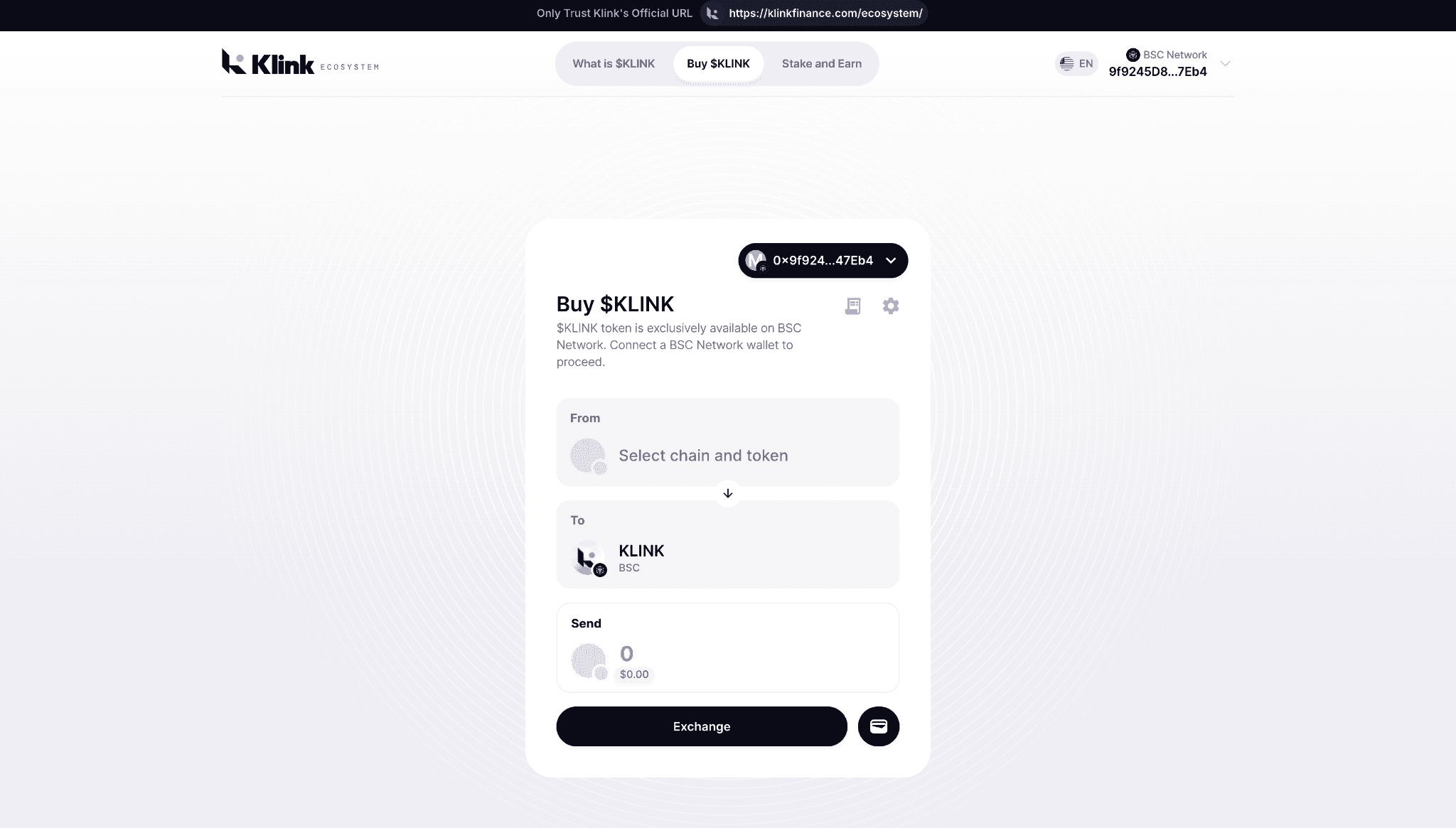
Select your token: In the “From” field, pick the token you currently hold for example, BNB, USDT, or another supported ERC-20 token.
Confirm your network: Make sure your wallet is set to BSC Network; Klink is native to it.
Choose KLINK as your output: In the “To” section, select KLINK (BSC)
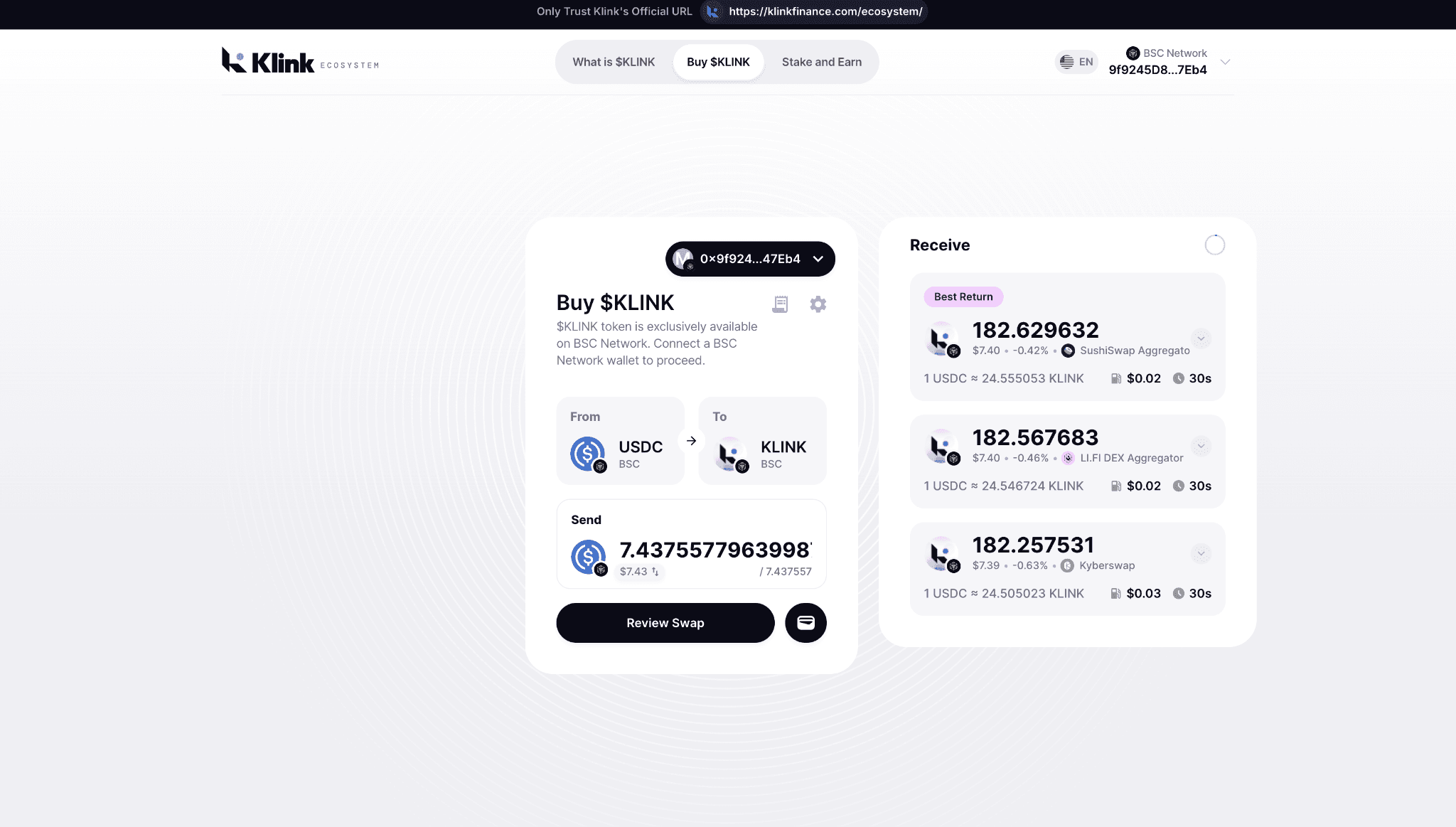
Enter the amount you want to convert and review the rate.
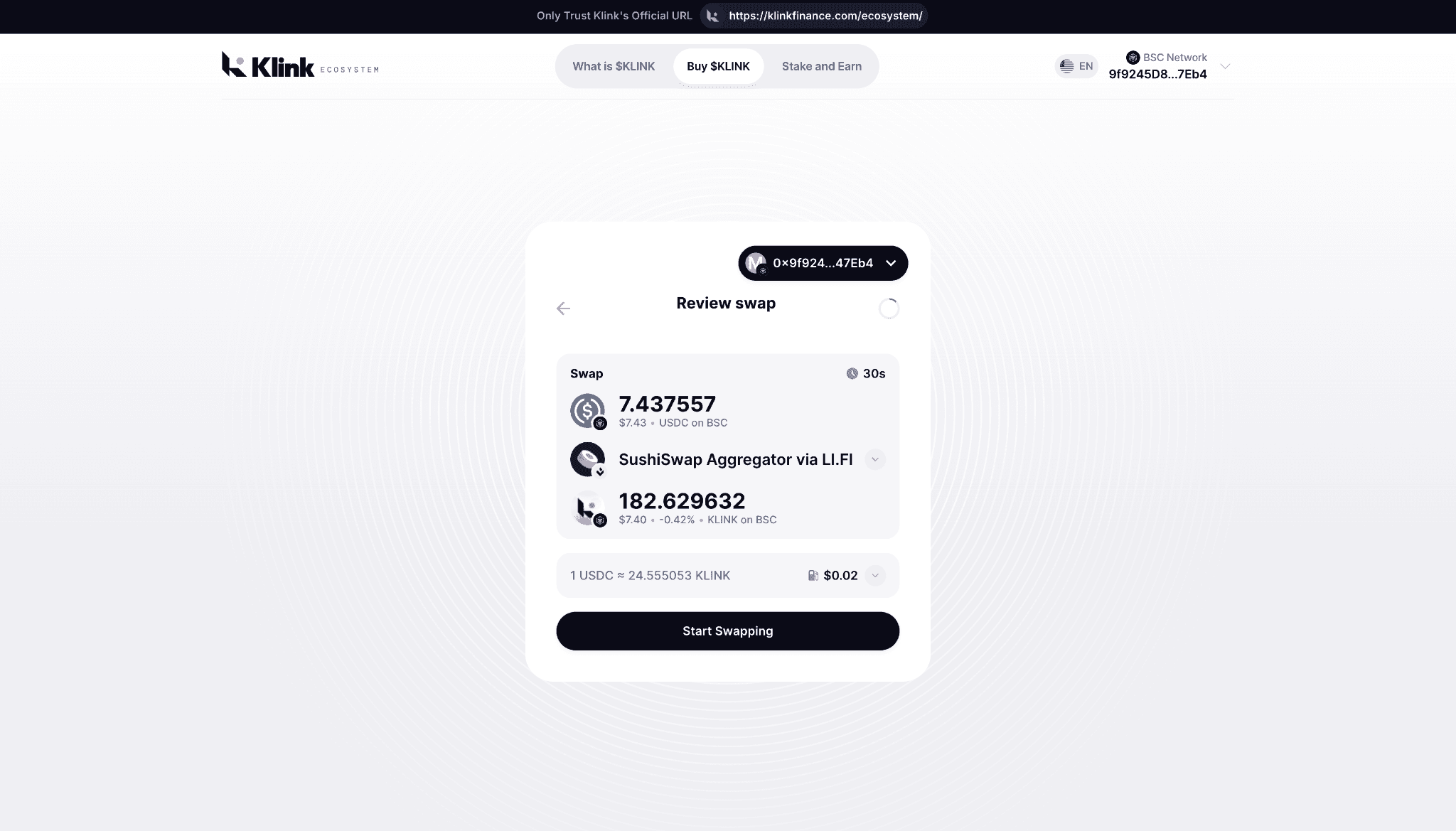
The system will fetch the best live quote, showing exactly how much KLINK you’ll receive. When you click Swap, MetaMask will ask for confirmation. After the transaction processes, your KLINK will appear in your wallet almost instantly.
That’s it, you’ve officially joined the Klink ecosystem.
Step 2: Checking the Pair on PancakeSwap
Klink’s liquidity is managed transparently through PancakeSwap, the largest DEX on BNB Smart Chain. If you’re curious about pricing, trading activity, or liquidity depth, you can look up the KLINK/WBNB pair directly on PancakeSwap.
You can even add liquidity yourself if you want to earn a share of trading fees.
If you want to dive deeper, PancakeSwap also provides full transparency with live data and BscScan links so you can verify transactions on-chain.
Step 3: Staking $KLINK and Earning Rewards on Pancakeswap
On PancakeSwap (built on Binance Smart Chain), liquidity providers (LPs) add equal values of two tokens to a pool, enabling seamless swaps. For $KLINK, the main pair is likely $KLINK/WBNB.
A wallet like MetaMask or Trust Wallet connected to BSC network. Hold $KLINK (contract: 0x76E9b54B49739837bE8aD10c3687Fc6b543de852) and BNB for gas + pairing. Visit PancakeSwap: https://pancakeswap.finance and switch to BSC
Here’s how you do it:
Step 1 - Add Liquidity
Go to Trade > Liquidity on PancakeSwap.
Select $KLINK and WBNB.
Enter amounts (equal value, e.g., $100 KLINK + equivalent BNB).
Approve tokens if needed, then "Supply" and confirm in wallet.
Earning Rewards
Once added, you automatically earn fees proportional to your pool share.
Check your position under "My Positions" for accrued fees.
If a $KLINK farm launches (stake LP for extra CAKE rewards), we'll announce it!
For now, focus on fee earnings as trading volume grows.
Once staked, your rewards begin to accumulate automatically. You can track your earnings live, and if you ever want to unstake, you’re free to do so at any time, there’s no unnecessary lock-in period unless specified by the pool.
This staking model gives users a way to earn passive yield while staying part of Klink’s ecosystem growth.
Why It’s Worth Trying
Crypto transactions can often feel like a maze, different chains, bridges, exchanges, and networks. Klink is solving that by integrating cross-chain swapping, transparent liquidity, and staking into one experience.
You can buy KLINK using tokens you already hold on any ERC-20 network, view its performance on PancakeSwap, and start earning from your holdings without ever leaving the ecosystem.
It’s simple, secure, and efficient which is exactly how onboarding into a Web3 ecosystem should feel.


High Quality Offers,
Real Payouts
Start Earning with Klink Now!








3
•
Select your token
Share Article
Related Articles
Read more, Earn more